
The gaming peripheral market has exploded with personality over the past few years, and nowhere is that more obvious than in the keyboard space. Gone are the days when gamers had to choose between blacked-out RGB rigs and boring beige office boards. In 2026, cute gaming keyboards have carved out a legitimate niche, combining pastel colorways, themed keycap sets, and adorable design elements with the same performance specs that competitive players demand.
Whether you’re rocking a kawaii desk setup, streaming with a cottagecore aesthetic, or just tired of the aggressive gamer aesthetic that’s dominated for decades, there’s never been a better time to go cute without compromising on response time, switch quality, or customization. This guide breaks down everything you need to know about cute gaming keyboards: what defines them, which features actually matter for performance, and which models in 2026 deliver both style and substance.
Key Takeaways
- Cute gaming keyboards now deliver competitive performance with pastel colorways and themed designs—mechanical switches, polling rates, and anti-ghosting tech rival traditional gaming boards regardless of aesthetic.
- Hot-swappable PCBs and artisan keycap customization have moved from niche hobby to mainstream, making cute gaming keyboards fully personalized without sacrificing response time.
- Budget-friendly cute keyboards like the Lofree Flow ($89) offer solid build quality and functionality, while premium options like Mode Sonnet deliver CNC-machined aluminum cases for enthusiasts willing to invest in durability.
- For competitive gaming, switch type and polling rate matter far more than case color—linear Gateron Yellows in a cute keyboard outperform budget membrane boards in aggressive-looking cases.
- Wireless connectivity in 2026 cute keyboards matches wired latency with added portability and cleaner desk aesthetics, making them ideal for streamers and LAN gamers prioritizing appearance.
- Proper maintenance—weekly dusting, monthly keycap cleaning, and cable care—keeps light-colored cute keyboards looking fresh and protects against yellowing while ensuring longevity beyond a decade.
What Makes a Gaming Keyboard “Cute”?
“Cute” is subjective, but in the gaming keyboard world, it’s come to represent a specific aesthetic movement that breaks from traditional gamer gear.
Aesthetic Design Elements
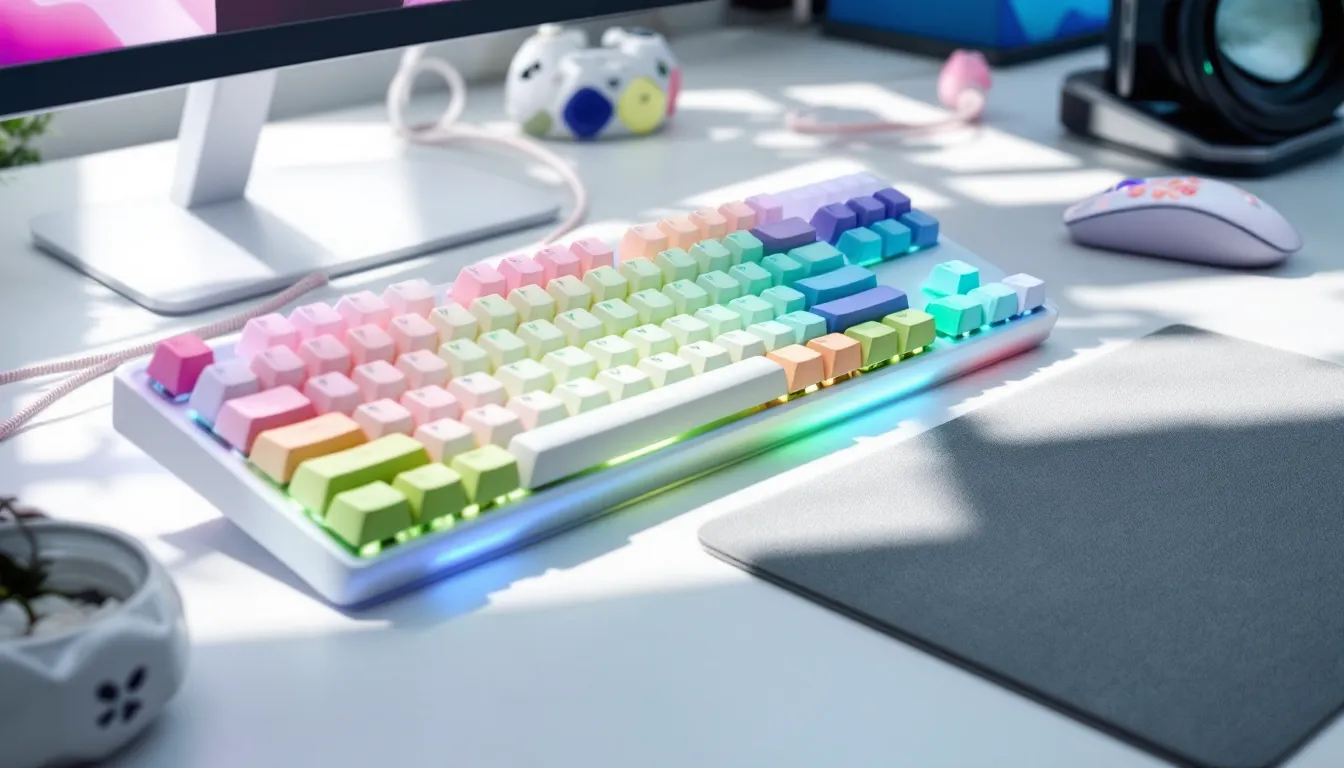
Cute keyboards lean heavily into softer visual language. Think rounded corners instead of sharp angles, themed novelty keycaps featuring cats, bunnies, or desserts, and case designs that prioritize approachability over aggression. Many manufacturers have embraced transparent or frosted cases that diffuse RGB lighting into a softer glow rather than the harsh, angular RGB strips found on traditional gaming boards.
Popular aesthetic themes include:
- Kawaii/Japanese-inspired: Pastel pink and blue colorways, cherry blossom motifs, anime character keycaps
- Cottagecore/Nature: Earthy greens, floral keycap sets, wood-grain wrist rests
- Retro/Vintage: Cream and beige color blocking reminiscent of ’80s computers, typewriter-style keycaps
- Fantasy/Whimsical: Unicorn themes, galaxy color schemes, magic girl aesthetics
The case material plays a huge role here. ABS and polycarbonate plastics allow for vibrant color options and translucency, while some premium models use powder-coated aluminum in non-traditional colors like lavender or mint.
Color Schemes and Customization Options
Color is the most immediate identifier of a cute keyboard. Where traditional gaming boards stick to black, white, or gunmetal gray, cute keyboards embrace the full spectrum, especially pastels and two-tone designs.
Common color schemes in 2026 include:
- Pastel gradients: Pink-to-purple or blue-to-mint fades
- Monochrome pastels: All-pink, all-lavender, or all-mint builds
- High-contrast cute: White base with pastel accent keys
- Themed palettes: Matching popular characters, shows, or aesthetics
Customization is where cute keyboards truly shine. Hot-swappable PCBs have become standard even in budget models, letting users mix keycap sets from different vendors. Artisan keycaps, hand-crafted resin caps shaped like tiny desserts, animals, or flowers, have moved from niche hobby to mainstream accessory. In 2026, you’ll find them sold directly by major keyboard manufacturers, not just custom shops.
Why Gamers Are Choosing Cute Keyboards
The rise of cute gaming keyboards isn’t just about aesthetics, it reflects broader shifts in gaming culture and workspace personalization.
Streaming has played a massive role. Content creators need setups that photograph and stream well, and a carefully curated cute desk setup generates more engagement than generic black gear. Platforms like Twitch and YouTube have made the gaming setup itself part of the personal brand, and cute keyboards became Instagram and TikTok gold starting around 2023.
But it goes deeper than social media. Gaming demographics have diversified significantly, and the traditional “aggressive gamer” aesthetic never resonated with everyone. Players who grew up with different visual references, anime, K-pop, indie games with soft art styles, wanted peripherals that matched their taste. The mechanical keyboard hobby community exploded during the pandemic, introducing millions of gamers to custom builds and aesthetic possibilities they didn’t know existed.
There’s also a psychological comfort factor. Gaming can be intense and competitive, and for many players, a softer, more personalized aesthetic creates a workspace that feels less like a battlestation and more like a creative sanctuary. When you’re grinding ranked matches for hours, surrounding yourself with things you genuinely find pleasant to look at reduces fatigue.
Performance hasn’t been sacrificed, either. Modern cute keyboards use the same Cherry MX, Gateron, or Kailh switches found in pro-grade boards. Polling rates hit 1000Hz standard, with some wireless models pushing 2000Hz in 2026. Anti-ghosting and N-key rollover are universal. The days of choosing between cute and competitive are over, you get both.
Top Features to Look for in a Cute Gaming Keyboard
Looking cute is one thing. Actually performing during a clutch round is another. Here’s what separates the Instagram props from legitimate gaming tools.
Mechanical vs. Membrane Switches
Mechanical switches are non-negotiable for serious gaming. They offer faster actuation, better tactile feedback, and significantly longer lifespans (50-100 million keystrokes vs. 5-10 million for membrane).
For cute keyboards, switch choice often comes down to sound profile:
- Linear switches (Red, Black, Yellow): Smooth, quiet, favored for gaming due to fast actuation with no tactile bump. Popular in streaming setups where mic pick-up matters.
- Tactile switches (Brown, Clear): Noticeable bump without the click sound. Good all-rounders for gaming and typing.
- Clicky switches (Blue, Green): Loud, satisfying click. Great for ASMR keyboard videos but can be annoying for teammates in voice chat.
Many 2026 cute keyboards use pre-lubed switches from the factory, reducing the scratchy feel and moderating sound. This was a custom-only feature two years ago but has trickled down to mid-range boards.
Membrane switches still appear in budget cute keyboards under $40. They’re fine for casual gaming but lack the responsiveness and durability that matters in competitive play. If you’re mostly playing turn-based or story games, membrane can work. For FPS, MOBA, or anything requiring rapid inputs, go mechanical.
RGB Lighting and Aesthetic Customization
RGB on cute keyboards serves a different purpose than on traditional gaming boards. Instead of rainbow vomit at maximum brightness, cute builds use RGB for ambient glow and thematic lighting.
Key features to look for:
- Per-key RGB: Lets you set individual key colors to match your aesthetic. Essential for custom color schemes.
- Underglow/side lighting: LEDs beneath the board that illuminate your desk. Creates a soft halo effect popular in cute setups.
- Lighting modes: Static colors matter more than cycling effects for aesthetic builds. Make sure the software lets you save custom profiles.
- Brightness control: You’ll want to dim it way down from gaming-board defaults for that soft pastel glow.
Software compatibility matters here. Brands like Razer Synapse, Corsair iCUE, and Logitech G Hub offer robust customization, but many cute keyboard brands use proprietary or browser-based software that ranges from excellent to barely functional. Check reviews specifically for software experience.
Wireless vs. Wired Connectivity
Wireless technology has finally caught up to wired in 2026, with latency differences measured in microseconds that won’t impact even pro-level play.
Wireless advantages:
- Cleaner desk aesthetic (huge for cute setups focused on appearance)
- Portability for LAN parties or moving between setups
- Most models include wired mode via USB-C for charging and zero-latency option
Wireless considerations:
- Battery life varies wildly (20 hours to 200+ hours depending on RGB use)
- Adds $30-80 to the price compared to wired versions
- Slightly heavier due to battery
Wired advantages:
- No charging needed, ever
- Typically lighter
- Often $20-50 cheaper than wireless versions
- Custom coiled cables have become a huge aesthetic element in cute builds
For cute keyboards specifically, wireless makes sense if you’re going for minimalist desk aesthetics. But if you’re into the custom cable scene, pastel aviator cables with matching colorways, wired becomes part of the look. Hardware review sites like Tom’s Hardware regularly test wireless latency if you want specific model comparisons.
Build Quality and Durability
Cute doesn’t mean fragile, but build quality varies dramatically in this market segment.
Case construction matters most. Aluminum cases provide better stability and acoustics than plastic, but they’re heavier and pricier. For cute boards, plastic is more common due to color options, but look for thick ABS or polycarbonate (1.5mm+) rather than thin, flexing cases.
Stabilizers are the unsung heroes of keyboard feel. They keep your larger keys (spacebar, shift, enter) from rattling or sticking. Factory-lubed stabilizers have become more common in 2026, but cheaper cute keyboards still ship with terrible stabs that rattle like a toy. This is one area where you might need to mod even a new board.
Keycap material:
- PBT (Polybutylene Terephthalate): More durable, textured finish, doesn’t develop shine from finger oils. Preferred for longevity.
- ABS (Acrylonitrile Butadiene Styrene): Smoother, can produce brighter colors, develops shine over 6-12 months of heavy use. Common in cute keyboards for aesthetic reasons.
Double-shot or dye-sublimated legends won’t fade like pad-printed keycaps. If your cute keyboard has intricate designs or characters on the caps, make sure they’re dye-sub or double-shot, or you’ll have blank keys within a year.
Best Cute Gaming Keyboards in 2026
The cute keyboard market has matured significantly. Here are the standout models across different price points and use cases.
Best Overall Cute Gaming Keyboard
Akko MOD007S PC Sakura Edition – $159
This board nails the balance between performance and aesthetic. The case comes in a gorgeous gradient pink-to-white colorway with a polycarbonate build that diffuses RGB beautifully. It ships with pre-lubed Akko V3 Cream Yellow switches (linear, 50g actuation) that feel smooth out of the box, no modding required.
Key specs:
- Layout: 75% (compact with F-row and arrow keys)
- Connectivity: Tri-mode (USB-C wired, 2.4GHz wireless, Bluetooth 5.1)
- Battery: 3000mAh (80+ hours with RGB off, 20 hours with moderate RGB)
- Hot-swap: Yes, supports 3-pin and 5-pin switches
- Software: Akko Cloud Driver with per-key RGB and macro support
- Extras: Includes coiled USB-C cable, PBT Cherry profile keycaps with Japanese sub-legends
Why it wins: The MOD007S PC delivers enthusiast-level build quality at a mid-range price. The gasket-mount design provides excellent acoustics and typing feel, and the tri-mode connectivity covers every use case. The included keycaps are high-quality PBT with detailed sub-legends that won’t fade. It’s cute enough to photograph well but neutral enough that it won’t clash if you change your desk aesthetic.
Best Budget-Friendly Option
Lofree Flow Low-Profile Kawaii Edition – $89
Lofree’s entry brings cute aesthetics to the budget tier without feeling like a toy. The low-profile design (22mm total height) makes it ultra-portable, and the pastel gradient case (available in pink, mint, and lavender) photographs way above its price point.
Key specs:
- Layout: 84-key (75% equivalent)
- Switches: Lofree Kailh low-profile tactile (1.5mm actuation)
- Connectivity: Bluetooth 5.1 (up to 3 devices) and USB-C wired
- Battery: 2000mAh (40 hours with backlighting on)
- Hot-swap: No (switches are soldered)
- Lighting: White backlight only (not RGB)
Why it’s worth it: At under $90, this is the gateway cute keyboard. The low-profile switches won’t satisfy mechanical purists, but they’re perfectly functional for gaming and significantly quieter than standard mechs. The lack of hot-swap and full RGB keeps costs down, but the build quality is surprisingly solid for the price. Great for students, casual gamers, or anyone testing the cute keyboard waters before committing to a pricier build.
Best Premium Cute Keyboard
Mode Sonnet in Lilac – $379 (barebones kit)
For enthusiasts willing to invest, Mode’s Sonnet represents the pinnacle of cute meets premium. This is a barebones kit, meaning you’ll need to supply your own switches and keycaps, but the customization possibilities are endless.
Key specs:
- Layout: 75%
- Case: CNC-machined aluminum in Lilac, Rose, or Cream finishes
- Mount: Top-mount design with configurable foam layers
- PCB: Hot-swap, QMK/VIA compatible for deep programming
- Connectivity: Wired USB-C only
- Weight: 3.9 lbs (hefty, premium feel)
- Extras: Includes FR4 plate, case foam, carrying case
Why it’s premium: Mode is a boutique manufacturer known for exceptional machining tolerances and acoustics. The Sonnet’s aluminum case provides a typing experience that budget boards can’t match, deeper sound, zero flex, and a weight that stays planted during intense gaming sessions. The lilac and rose colorways bring a soft aesthetic without compromising the premium, refined feel. This is for gamers who want a keyboard that’ll last a decade and serve as a desk centerpiece.
Budget an additional $100-150 for switches and keycaps to complete the build.
Best Compact and Portable Design
Nuphy Air60 Boba Edition – $119
Nuphy’s ultra-slim Air60 comes in a boba-tea-inspired colorway (brown, cream, and pastel pink accents) that’s become wildly popular in 2026. At just 17mm tall and 570 grams, it’s the most portable cute keyboard on the market.
Key specs:
- Layout: 60% (no F-row, no arrow keys – pure compact)
- Switches: Nuphy low-profile Wisteria (tactile, 55g)
- Connectivity: Tri-mode (2.4GHz, Bluetooth 5.0, USB-C)
- Battery: 2000mAh (48 hours with RGB effects on)
- Hot-swap: Yes (low-profile switches only)
- Keycaps: PBT with south-facing LEDs for better shine-through
Why it excels: The Air60 absolutely nails the portable cute aesthetic. It fits in most laptop bags, the low profile means you can type for hours without wrist strain, and the boba colorway is distinct without being loud. The 60% layout takes adjustment if you’re used to arrow keys and F-row, but gamers who’ve made the switch report faster muscle memory development and less hand movement during gameplay. Perfect for LAN events, college dorm setups, or switching between gaming PC and console.
Tech review platforms like TechRadar have consistently rated the Air60 series highly for build quality relative to price.
How to Customize Your Cute Gaming Keyboard
Out-of-the-box cute is just the starting point. The customization rabbit hole goes deep, and that’s where the magic happens.
Keycap Sets and Replacements
Keycaps are the fastest, most dramatic way to transform your board’s look. The keycap market exploded in 2024-2025, and 2026 offers more cute options than ever.
Popular cute keycap profiles:
- Cherry profile: Low, sculpted. Most common and gaming-friendly.
- XDA/DSA: Flat, uniform height. Gives a retro, typewriter aesthetic.
- SA profile: Tall, sculpted. Very retro, not ideal for gaming due to height.
- OEM profile: Standard on most pre-builts. Medium height, familiar feel.
Where to find cute keycap sets:
- Drop.com: Runs group buys for designer sets (GMK, ePBT) with themes like “Botanical,” “Peaches n Cream,” and “Pastel Dreams.” Expect $80-150 and 3-6 month waits.
- AliExpress/KBDfans: Budget PBT sets in kawaii themes, cats, desserts, florals. $30-60 with fast shipping.
- Etsy: Artisan keycaps and small-batch custom sets. Prices vary wildly ($5-50 per artisan cap).
- Manufacturer sites: Akko, Ducky, and HyperX sell themed sets directly that fit most Cherry MX-compatible boards.
Artisan keycaps are miniature sculptures that replace single keys (usually Esc or function keys). Popular cute themes include:
- Resin-cast animals (cats, bunnies, axolotls)
- Food items (boba tea, macarons, sushi)
- Flowers and plants
- Character-inspired designs from anime or games
A word of warning: artisan keycaps can become an expensive addiction fast. Set a budget before you start browsing.
Custom Cable Options
If you’re running wired, a custom cable is a must-have finishing touch for a cute build. Standard black rubber USB cables destroy the aesthetic.
Custom cable features:
- Coiled/aviator style: The signature look. A coiled section near the keyboard connects to a straight section via an aviator connector (the gold or silver circular junction).
- Color matching: Cable makers offer hundreds of paracord colors and heat-shrink options to match your keycap sets.
- Length options: Typically 4-6 feet total, with the coil adding visual interest.
- Connectors: Most cute keyboards use USB-C. Verify before ordering.
Where to buy:
- Space Cables, CableMod, Mechcables: Premium custom cable makers ($40-80)
- Etsy shops: Small makers often do themed cables or one-offs ($25-60)
- AliExpress: Budget pre-made coiled cables in common colorways ($12-25)
Installation is plug-and-play, but handle the coils gently, repeated stretching will deform them over time.
Desk Mat and Accessory Pairing
A cute keyboard deserves an equally cute environment. Desk mats have become central to aesthetic gaming setups.
Desk mat considerations:
- Size: Extended mats (36×18″ or larger) fit both keyboard and mouse, creating a unified color base.
- Material: Most are stitched-edge cloth over rubber. Some premium mats use microfiber tops for smoother mouse glide.
- Design: Match your keyboard’s color scheme or theme. Popular cute designs include cherry blossoms, starry nights, pastel gradients, and character art.
- Pricing: $15-40 for most, $50+ for licensed or limited-edition designs.
Accessory pairings:
- Wrist rests: Wood, resin, or foam. Cute options include cloud-shaped rests, pastel gradient foam, or resin-cast rests with dried flowers.
- Monitor stands/risers: Acrylic or wood in matching colors elevate monitors and create space for keyboard sliding.
- Cable management: Adhesive clips or under-desk trays in white or pastel colors keep the clean aesthetic intact.
The goal is cohesion without being matchy to the point of sterility. Mixing complementary pastel tones (mint keyboard, lavender mat, pink mouse) often looks more dynamic than perfect color matches.
Performance vs. Aesthetics: Finding the Balance
Can a keyboard covered in bunny keycaps actually hold up in ranked? Absolutely, if you know what performance specs actually matter.
Gaming Performance Considerations
Let’s kill a myth: cute keyboards are not inherently slower or less responsive than aggressive gamer boards. Performance comes down to specs, not color.
Key performance metrics:
- Polling rate: How often the keyboard reports inputs to your PC. 1000Hz (1ms) is standard: 2000Hz (0.5ms) is available in high-end wireless boards. Anything above 500Hz is imperceptible to human reaction times, but higher is technically better.
- Actuation force and distance: How hard and far you press before input registers. Linear switches with 45-50g actuation and 1.5-2mm travel are fastest for gaming. Cute keyboards use the same switch options as any other board.
- Anti-ghosting and N-key rollover (NKRO): Ensures every keypress registers even when mashing multiple keys. Basically universal in 2026, even on budget cute keyboards.
- Switch latency: High-quality mechanical switches (Cherry, Gateron, Kailh) have 5-10ms total latency. Membrane boards can hit 30-50ms. Cute or not, go mechanical for competitive gaming.
Real-world gaming:
Players have hit Radiant in Valorant, Global Elite in CS2, and Legend ranks in Apex using pastel keyboards with cat keycaps. Reviews from esports gear specialists like ProSettings show that switch type matters far more than case color. A cute keyboard with Gateron Yellows will outperform a “gaming” board with cheap membrane switches every time.
The only aesthetic choice that might impact performance is keycap profile. Super tall SA profile caps require more finger travel between keys, which could theoretically slow input in games requiring rapid key combinations. Stick with Cherry, OEM, or XDA profiles for competitive play.
Typing Comfort for Extended Sessions
Gaming sessions often involve a lot of typing, chat, Discord, strategy coordination, streaming interaction. Cute keyboards often excel here because many prioritize typing acoustics and feel alongside gaming performance.
Comfort factors:
- Switch choice: Tactile switches (Browns, Boba U4Ts) provide feedback without the fatigue of heavy clickies. Linears (Reds, Yellows) are smooth but lack the confirmation bump some typists prefer.
- Keycap texture: PBT’s slight texture provides better grip during long sessions than slick ABS, reducing finger slip and fatigue.
- Board angle: Most cute keyboards include flip-out feet for 5-7 degree typing angles. Lower angles reduce wrist strain during extended use.
- Wrist rest: Not included with most boards, but a matching cute wrist rest reduces pressure on the carpal tunnel during marathon sessions.
Acoustic comfort matters more than many realize. Streaming with a clicky Blue switch keyboard will drive your audience insane. Pre-lubed linear or tactile switches in a well-dampened case provide satisfying feedback without overwhelming your mic. Foam-modded boards (case foam, plate foam, PCB foam) significantly reduce hollow ping and create a deeper, more pleasant sound signature.
If you’re someone who games for 4+ hours at a stretch, prioritize boards with good acoustics and comfortable keycap profiles. Your fingers, and your Discord server, will thank you.
Caring for Your Cute Gaming Keyboard
Cute keyboards are investments, and proper maintenance keeps them looking and performing their best for years.
Regular cleaning:
Dust, crumbs, and oils build up faster than you’d think, especially on light-colored cases and keycaps.
- Weekly: Use a soft microfiber cloth to wipe down keycaps and the case. For stubborn finger oils, slightly dampen the cloth with water (never spray liquid directly on the board).
- Monthly: Remove keycaps using a keycap puller (usually included, or buy one for $5). Wash keycaps in warm soapy water, rinse thoroughly, and let air dry completely (24 hours). While caps are off, use compressed air to blow debris from the switch housing and PCB.
- Quarterly: Deep clean with isopropyl alcohol (70%+) on a cotton swab for switch stems and stabilizers. Clean any visible gunk from stabilizer wires.
Protecting light-colored cases:
Pastel and white cases show yellowing over time, especially from UV exposure and hand oils.
- Keep your keyboard out of direct sunlight. UV is the primary cause of plastic yellowing.
- Wash hands before gaming sessions to minimize oil transfer.
- Use a keyboard cover or dust cover when not in use if your setup is in a sunny room.
- For stubborn yellowing on white/cream cases, retrobright treatments exist but require careful chemical handling.
Switch and stabilizer maintenance:
Mechanical switches last 50-100 million presses, but stabilizers can develop rattle or sticking over time.
- If spacebar or shift keys start rattling, remove the keycap and apply dielectric grease or permatex to the stabilizer wire contact points.
- Scratchy switches can be lubed with Krytox 205g0 (requires switch disassembly and patience, or pay a modder $40-60 to do it).
- Hot-swap sockets occasionally loosen. If a key stops registering, reseat the switch firmly.
Cable care:
Custom coiled cables are gorgeous but fragile.
- Never pull the cable taut. The coil should rest naturally with a bit of slack.
- Disconnect by gripping the connector housing, not the cable itself.
- Store coiled cables loosely coiled, never stretched straight or tightly wound.
Software and firmware:
Most cute keyboards have updateable firmware. Check the manufacturer’s site every 6-12 months for updates that fix bugs or add features. Back up your lighting profiles and macros before updating, some firmware flashes reset customizations.
With basic care, a quality cute keyboard will outlast your current PC, monitor, and possibly your entire desk setup. Treat it right, and those pastel keycaps will still look fresh years from now.
Where to Buy Cute Gaming Keyboards
The cute keyboard market spans mainstream retailers, specialty shops, and direct-from-maker sales. Where you buy affects price, selection, and support.
Mainstream retailers:
- Amazon: Widest selection of budget and mid-range cute keyboards. Brands like Akko, Lofree, RK Royal Kludge, and Epomaker are readily available with Prime shipping. Watch for knock-offs on lesser-known brands, verify seller reputation.
- Best Buy: Limited cute selection, but carries Logitech, Razer, and Corsair’s pastel or white colorway models. Good for in-person testing and easy returns.
- Newegg: Strong selection of gaming keyboards with occasional sales on cute models from GMMK, Ducky, and Keychron.
Specialty mechanical keyboard shops:
- MechanicalKeyboards.com: Curated selection focusing on quality brands. Excellent customer service and detailed product specs.
- KBDfans: China-based but ships globally. Huge selection of DIY kits, keycaps, and switches. Expect 2-3 week shipping.
- Drop.com: Known for exclusive collaborations and group buys. You’ll find unique colorways here that don’t exist elsewhere, but group buys mean long waits (3-6 months).
- Divinikey, CannonKeys, Novelkeys: US-based enthusiast shops with curated inventories and active communities.
Direct from manufacturers:
Brands like Akko, Keychron, Nuphy, and Epomaker sell directly from their websites, often offering exclusive colorways or bundle deals not available through retailers. Prices are usually competitive with Amazon, and you’re guaranteed authentic products.
Group buys and limited releases:
High-end cute keyboards (like Mode’s pastel colorways or GMK keycap sets) often sell through group buys, you pay upfront, production happens after the buy closes, and you wait months for delivery. This model funds small-batch production but requires patience and trust in the maker.
- Geekhack and Reddit r/MechanicalKeyboards: Where group buys are announced and discussed.
- Discord servers: Many keyboard makers run Discord communities with early access to sales and limited colorways.
Used and aftermarket:
- Reddit r/mechmarket: Buy, sell, trade used keyboards and parts. You’ll find discontinued colorways and builds here. Use PayPal Goods & Services for buyer protection.
- Facebook Marketplace and OfferUp: Local sales, good for avoiding shipping costs on heavy keyboards.
- eBay: Wide selection but higher scam risk. Verify seller ratings and return policies.
International considerations:
Many cute keyboard brands (Akko, Epomaker, RK) are China-based. Shipping times vary (7-30 days), and customs fees may apply on orders over $800 in the US. Factor this into your budget and timeline.
For first-time buyers, sticking with Amazon or direct manufacturer sites offers the best balance of selection, shipping speed, and return protection. Once you know what you like, specialty shops and group buys open up customization options you can’t find anywhere else.
Conclusion
Cute gaming keyboards have evolved from niche novelties to legitimate high-performance peripherals that happen to look adorable. In 2026, you’re not compromising on response time, build quality, or customization when you choose a pastel pink board over matte black, you’re just picking a different aesthetic lane.
The market has matured to the point where every budget tier has solid cute options. Whether you’re dropping $89 on a Lofree Flow or $400 on a Mode Sonnet, you’re getting mechanical switches, quality construction, and the performance needed for competitive play. The explosion of keycap sets, artisan caps, custom cables, and matching accessories means your cute keyboard can be as unique as your playstyle.
What matters most isn’t color scheme, it’s finding switches you enjoy, a layout that fits your workflow, and build quality that’ll last. If that package happens to come in lavender with bunny-ear keycaps, that’s just a bonus. Your desk, your rules. Game hard, look cute, and don’t let anyone tell you aesthetics and performance are mutually exclusive. They haven’t been for years.